Factory Reset of the Spin Bridge
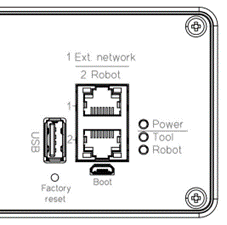
The Spin Bridge can be reset using the Factory Reset button located on the front panel.
Reset Types
Short press (< 5 seconds): Resets network settings only
Long press (≥ 5 seconds): Performs a full factory reset
Procedure
Locate the Factory Reset button on the front of the Spin Bridge
Press and hold the button
Release the button according to the desired reset type
The button must be held continuously; releasing it early cancels the reset.
Notice
A long press performs a complete factory reset. It deletes all screw programs and all stored screw traces, and resets all user settings to default. This cannot be undone. To reset only the network settings, release the button before 5 seconds.