Core Concepts
A robot works the tool in two ways. It can call a tool action, which makes the tool do one small thing and stop. Or it can start a screwdriving program, which lets the tool take over and drive a screw from beginning to end.
Tool Actions
A tool action is one simple command to the tool. Move the safety shield. Start the motor. Lock the bit. Clear an error.
The tool does that one thing and then waits. The robot is still running the show, and decides what happens next.
Screwdriving Programs
Driving a screw well is not a single movement. The tool has to find the hole, run the screw most of the way down quickly, and then slow down and tighten it to the right point. So a screwdriving program is a list of steps, carried out one after another.
Each step tells the tool how to behave while that step lasts — how fast to turn, how hard to press, how tight to go. Each step also watches for the moment it should hand over to the next one. A step is not given a set time to run: it ends when what it is watching tells it to.
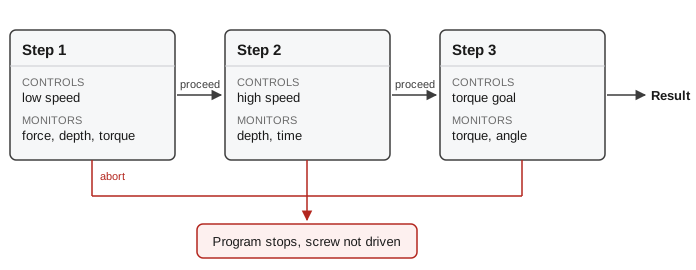
Each step sets how the tool turns, and watches for the moment to move on.
Watching is also how the tool notices that something has gone wrong. A step waiting for the screw to catch the thread can stop the program instead, if the tool has gone deeper than it should have without catching anything.
Results
Every screw the tool drives leaves a result behind: a recording of what happened while it went in, and a verdict on how it turned out.
The verdict is one of three. OK means the screw ended up the way the program asked. NOT OK means the screw went in, but not to the right tightness or depth. Fault means the tool could not finish at all.
Results are kept on the Spin Bridge, so any screw can be looked at again later. The verdict also goes back to the robot, which can act on it.
Screwdriving Programs vs Robot Programs
These are two separate programs, written in two different places, and they control different halves of the job.
The robot program decides where: which hole, in what order, and what to do about a screw that failed. You write it on the robot, the way you write any robot program.
The screwdriving program decides how: how fast, how hard, how tight. You write it in the Spin Dashboard and give it a name, and the robot program starts it by that name.
So if a screw comes out too tight, that is the screwdriving program, and editing the robot program will not change it. If the tool arrives in the wrong place, that is the robot program.